TP-Link Archer T4U AC1200 Wireless Dual Band USB Adapter Linux Drivers
Internal photos of the TP-Link Archer T4U Wireless Adapter lodged with the FCC shows this device consists of a RealTek RTL8812au chipset.
The T4U has a USB Vendor ID (VID) of 0x2357 and Product ID (PID) of 0x101.
To date, the mainline Linux Kernel does not support this device, hence drivers need to be compiled manually.
One source for the drivers is Anand Babu (AB) Periasamy's git repository. Clone the source:
git clone https://github.com/abperiasamy/rtl8812AU_8821AU_linux.git
cd rtl8812AU_8821AU_linux/
TP-Link T4U's USB VID and PID has not yet been included. Edit op_dep/linux/usb_intf.c and add the following line to the bottom of the CONFIG_RTL8812A #ifdef section.
{USB_DEVICE(0x2357, 0x0101),.driver_info = RTL8812}, /* TP-Link - T4U */
Now you are ready to make and install the driver:
make
sudo make install
At this stage, plugging in a T4U dongle should be detected and the appropriate driver loaded:
[ 57.083756] usb 1-1: new high-speed USB device number 2 using ehci-pci
[ 57.292224] usb 1-1: New USB device found, idVendor=2357, idProduct=0101
[ 57.292231] usb 1-1: New USB device strings: Mfr=1, Product=2, SerialNumber=3
[ 57.292234] usb 1-1: Product: 802.11n NIC
[ 57.292236] usb 1-1: Manufacturer: Realtek
[ 57.292238] usb 1-1: SerialNumber: 123456
[ 57.337273] cfg80211: Calling CRDA to update world regulatory domain
[ 57.486501] 8812au: module verification failed: signature and/or required key missing - tainting kernel
[ 57.507475] cfg80211: World regulatory domain updated:
[ 57.507480] cfg80211: (start_freq - end_freq @ bandwidth), (max_antenna_gain, max_eirp)
[ 57.507482] cfg80211: (2402000 KHz - 2472000 KHz @ 40000 KHz), (300 mBi, 2000 mBm)
[ 57.507485] cfg80211: (2457000 KHz - 2482000 KHz @ 40000 KHz), (300 mBi, 2000 mBm)
[ 57.507487] cfg80211: (2474000 KHz - 2494000 KHz @ 20000 KHz), (300 mBi, 2000 mBm)
[ 57.507488] cfg80211: (5170000 KHz - 5250000 KHz @ 40000 KHz), (300 mBi, 2000 mBm)
[ 57.507490] cfg80211: (5735000 KHz - 5835000 KHz @ 40000 KHz), (300 mBi, 2000 mBm)
[ 61.711265] usbcore: registered new interface driver rtl8812au

On RPM based Linux OS, tcpdump can be installed using below yum command
# yum install tcpdump -yWhen we run the tcpdump command without any options then it will capture packets of all the interfaces. So to stop or cancel the tcpdump command, type “ctrl+c” . In this tutorial we will discuss how to capture and analyze packets using different practical examples,
Example:1) Capturing packets from a specific interface
When we run the tcpdump command without any options, it will capture packets on the all interfaces, so to capture the packets from a specific interface use the option ‘-i‘ followed by the interface name.Syntax :
# tcpdump -i {interface-name}
Let’s assume, i want to capture packets from interface “enp0s3”
[root@compute-0-1 ~]# tcpdump -i enp0s3
Output would be something like below,tcpdump: verbose output suppressed, use -v or -vv for full protocol decode listening on enp0s3, link-type EN10MB (Ethernet), capture size 262144 bytes 06:43:22.905890 IP compute-0-1.example.com.ssh > 169.144.0.1.39374: Flags [P.], seq 21952160:21952540, ack 13537, win 291, options [nop,nop,TS val 26164373 ecr 6580205], length 380 06:43:22.906045 IP compute-0-1.example.com.ssh > 169.144.0.1.39374: Flags [P.], seq 21952540:21952760, ack 13537, win 291, options [nop,nop,TS val 26164373 ecr 6580205], length 220 06:43:22.906150 IP compute-0-1.example.com.ssh > 169.144.0.1.39374: Flags [P.], seq 21952760:21952980, ack 13537, win 291, options [nop,nop,TS val 26164373 ecr 6580205], length 220 06:43:22.906291 IP 169.144.0.1.39374 > compute-0-1.example.com.ssh: Flags [.], ack 21952980, win 13094, options [nop,nop,TS val 6580205 ecr 26164373], length 0 06:43:22.906303 IP 169.144.0.1.39374 > compute-0-1.example.com.ssh: Flags [P.], seq 13537:13609, ack 21952980, win 13094, options [nop,nop,TS val 6580205 ecr 26164373], length 72 06:43:22.906322 IP compute-0-1.example.com.ssh > 169.144.0.1.39374: Flags [P.], seq 21952980:21953200, ack 13537, win 291, options [nop,nop,TS val 26164373 ecr 6580205], length 220 ^C 109930 packets captured 110065 packets received by filter 133 packets dropped by kernel [root@compute-0-1 ~]#
Example:2) Capturing specific number number of packet from a specific interface
Let’s assume we want to capture 12 packets from the specific interface like “enp0s3”, this can be easily achieved using the options “-c {number} -i {interface-name}”root@compute-0-1 ~]# tcpdump -c 12 -i enp0s3
Above command will generate the output something like below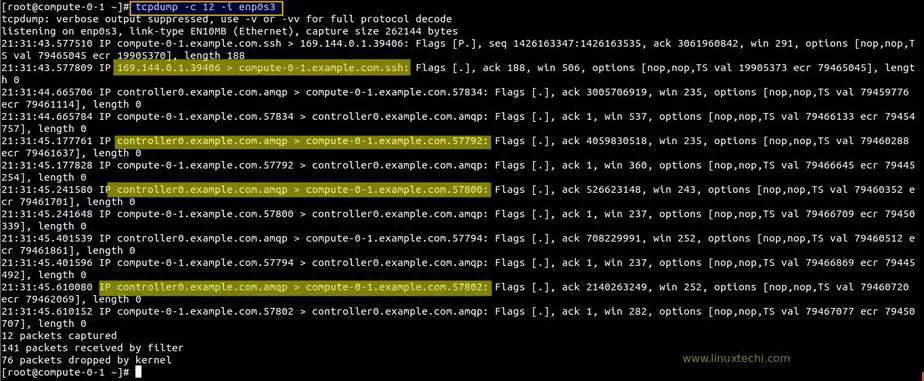
Example:3) Display all the available Interfaces for tcpdump
Use ‘-D‘ option to display all the available interfaces for tcpdump command,[root@compute-0-1 ~]# tcpdump -D
1.enp0s3
2.enp0s8
3.ovs-system
4.br-int
5.br-tun
6.nflog (Linux netfilter log (NFLOG) interface)
7.nfqueue (Linux netfilter queue (NFQUEUE) interface)
8.usbmon1 (USB bus number 1)
9.usbmon2 (USB bus number 2)
10.qbra692e993-28
11.qvoa692e993-28
12.qvba692e993-28
13.tapa692e993-28
14.vxlan_sys_4789
15.any (Pseudo-device that captures on all interfaces)
16.lo [Loopback]
[root@compute-0-1 ~]#
I am running the tcpdump command on one of
my openstack compute node, that’s why in the output you have seen
number interfaces, tab interface, bridges and vxlan interface.Example:4) Capturing packets with human readable timestamp (-tttt option)
By default in tcpdump command output, there is no proper human readable timestamp, if you want to associate human readable timestamp to each captured packet then use ‘-tttt‘ option, example is shown below,[root@compute-0-1 ~]# tcpdump -c 8 -tttt -i enp0s3
tcpdump: verbose output suppressed, use -v or -vv for full protocol decode
listening on enp0s3, link-type EN10MB (Ethernet), capture size 262144 bytes
2018-08-25 23:23:36.954883 IP compute-0-1.example.com.ssh > 169.144.0.1.39406: Flags [P.], seq 1449206247:1449206435, ack 3062020950, win 291, options [nop,nop,TS val 86178422 ecr 21583714], length 188
2018-08-25 23:23:36.955046 IP 169.144.0.1.39406 > compute-0-1.example.com.ssh: Flags [.], ack 188, win 13585, options [nop,nop,TS val 21583717 ecr 86178422], length 0
2018-08-25 23:23:37.140097 IP controller0.example.com.amqp > compute-0-1.example.com.57818: Flags [P.], seq 814607956:814607964, ack 2387094506, win 252, options [nop,nop,TS val 86172228 ecr 86176695], length 8
2018-08-25 23:23:37.140175 IP compute-0-1.example.com.57818 > controller0.example.com.amqp: Flags [.], ack 8, win 237, options [nop,nop,TS val 86178607 ecr 86172228], length 0
2018-08-25 23:23:37.355238 IP compute-0-1.example.com.57836 > controller0.example.com.amqp: Flags [P.], seq 1080415080:1080417400, ack 1690909362, win 237, options [nop,nop,TS val 86178822 ecr 86163054], length 2320
2018-08-25 23:23:37.357119 IP controller0.example.com.amqp > compute-0-1.example.com.57836: Flags [.], ack 2320, win 1432, options [nop,nop,TS val 86172448 ecr 86178822], length 0
2018-08-25 23:23:37.357545 IP controller0.example.com.amqp > compute-0-1.example.com.57836: Flags [P.], seq 1:22, ack 2320, win 1432, options [nop,nop,TS val 86172449 ecr 86178822], length 21
2018-08-25 23:23:37.357572 IP compute-0-1.example.com.57836 > controller0.example.com.amqp: Flags [.], ack 22, win 237, options [nop,nop,TS val 86178825 ecr 86172449], length 0
8 packets captured
134 packets received by filter
69 packets dropped by kernel
[root@compute-0-1 ~]#
Example:5) Capturing and saving packets to a file (-w option)
Use “-w” option in tcpdump command to save the capture TCP/IP packet to a file, so that we can analyze those packets in the future for further analysis.Syntax :
# tcpdump -w file_name.pcap -i {interface-name}
Note: Extension of file must be .pcap
Let’s assume i want to save the captured packets of interface “enp0s3” to a file name enp0s3-26082018.pcap
[root@compute-0-1 ~]# tcpdump -w enp0s3-26082018.pcap -i enp0s3
Above command will generate the output something like below,[root@compute-0-1 ~]# tcpdump -w enp0s3-26082018.pcap -i enp0s3 tcpdump: listening on enp0s3, link-type EN10MB (Ethernet), capture size 262144 bytes ^C841 packets captured 845 packets received by filter 0 packets dropped by kernel [root@compute-0-1 ~]# ls anaconda-ks.cfg enp0s3-26082018.pcap [root@compute-0-1 ~]#Capturing and Saving the packets whose size greater than N bytes
[root@compute-0-1 ~]# tcpdump -w enp0s3-26082018-2.pcap greater 1024
Capturing and Saving the packets whose size less than N bytes[root@compute-0-1 ~]# tcpdump -w enp0s3-26082018-3.pcap less 1024
Example:6) Reading packets from the saved file ( -r option)
In the above example we have saved the captured packets to a file, we can read those packets from the file using the option ‘-r‘, example is shown below,[root@compute-0-1 ~]# tcpdump -r enp0s3-26082018.pcap
Reading the packets with human readable timestamp,[root@compute-0-1 ~]# tcpdump -tttt -r enp0s3-26082018.pcap
reading from file enp0s3-26082018.pcap, link-type EN10MB (Ethernet)
2018-08-25 22:03:17.249648 IP compute-0-1.example.com.ssh > 169.144.0.1.39406: Flags [P.], seq 1426167803:1426167927, ack 3061962134, win 291, options
[nop,nop,TS val 81358717 ecr 20378789], length 124
2018-08-25 22:03:17.249840 IP 169.144.0.1.39406 > compute-0-1.example.com.ssh: Flags [.], ack 124, win 564, options [nop,nop,TS val 20378791 ecr 81358
717], length 0
2018-08-25 22:03:17.454559 IP controller0.example.com.amqp > compute-0-1.example.com.57836: Flags [.], ack 1079416895, win 1432, options [nop,nop,TS v
al 81352560 ecr 81353913], length 0
2018-08-25 22:03:17.454642 IP compute-0-1.example.com.57836 > controller0.example.com.amqp: Flags [.], ack 1, win 237, options [nop,nop,TS val 8135892
2 ecr 81317504], length 0
2018-08-25 22:03:17.646945 IP compute-0-1.example.com.57788 > controller0.example.com.amqp: Flags [.], seq 106760587:106762035, ack 688390730, win 237
, options [nop,nop,TS val 81359114 ecr 81350901], length 1448
2018-08-25 22:03:17.647043 IP compute-0-1.example.com.57788 > controller0.example.com.amqp: Flags [P.], seq 1448:1956, ack 1, win 237, options [nop,no
p,TS val 81359114 ecr 81350901], length 508
2018-08-25 22:03:17.647502 IP controller0.example.com.amqp > compute-0-1.example.com.57788: Flags [.], ack 1956, win 1432, options [nop,nop,TS val 813
52753 ecr 81359114], length 0
.........................................................................................................................
Read More on : How to Install and Use Wireshark on Debian 9 / Ubuntu 16.04Example:7) Capturing only IP address packets on a specific Interface (-n option)
Using -n option in tcpdum command we can capture only IP address packets on specific interface, example is shown below,[root@compute-0-1 ~]# tcpdump -n -i enp0s3
Output of above command would be something like below,tcpdump: verbose output suppressed, use -v or -vv for full protocol decode listening on enp0s3, link-type EN10MB (Ethernet), capture size 262144 bytes 22:22:28.537904 IP 169.144.0.20.ssh > 169.144.0.1.39406: Flags [P.], seq 1433301395:1433301583, ack 3061976250, win 291, options [nop,nop,TS val 82510005 ecr 20666610], length 188 22:22:28.538173 IP 169.144.0.1.39406 > 169.144.0.20.ssh: Flags [.], ack 188, win 9086, options [nop,nop,TS val 20666613 ecr 82510005], length 0 22:22:28.538573 IP 169.144.0.20.ssh > 169.144.0.1.39406: Flags [P.], seq 188:552, ack 1, win 291, options [nop,nop,TS val 82510006 ecr 20666613], length 364 22:22:28.538736 IP 169.144.0.1.39406 > 169.144.0.20.ssh: Flags [.], ack 552, win 9086, options [nop,nop,TS val 20666613 ecr 82510006], length 0 22:22:28.538874 IP 169.144.0.20.ssh > 169.144.0.1.39406: Flags [P.], seq 552:892, ack 1, win 291, options [nop,nop,TS val 82510006 ecr 20666613], length 340 22:22:28.539042 IP 169.144.0.1.39406 > 169.144.0.20.ssh: Flags [.], ack 892, win 9086, options [nop,nop,TS val 20666613 ecr 82510006], length 0 22:22:28.539178 IP 169.144.0.20.ssh > 169.144.0.1.39406: Flags [P.], seq 892:1232, ack 1, win 291, options [nop,nop,TS val 82510006 ecr 20666613], length 340 22:22:28.539282 IP 169.144.0.1.39406 > 169.144.0.20.ssh: Flags [.], ack 1232, win 9086, options [nop,nop,TS val 20666614 ecr 82510006], length 0 22:22:28.539479 IP 169.144.0.20.ssh > 169.144.0.1.39406: Flags [P.], seq 1232:1572, ack 1, win 291, options [nop,nop,TS val 82510006 ecr 20666614], length 340 22:22:28.539595 IP 169.144.0.1.39406 > 169.144.0.20.ssh: Flags [.], ack 1572, win 9086, options [nop,nop,TS val 20666614 ecr 82510006], length 0 22:22:28.539760 IP 169.144.0.20.ssh > 169.144.0.1.39406: Flags [P.], seq 1572:1912, ack 1, win 291, options [nop,nop,TS val 82510007 ecr 20666614], length 340 .........................................................................You can also capture N number of IP address packets using -c and -n option in tcpdump command,
[root@compute-0-1 ~]# tcpdump -c 25 -n -i enp0s3
Example:8) Capturing only TCP packets on a specific interface
In tcpdump command we can capture only tcp packets using the ‘tcp‘ option,[root@compute-0-1 ~]# tcpdump -i enp0s3 tcp
tcpdump: verbose output suppressed, use -v or -vv for full protocol decode
listening on enp0s3, link-type EN10MB (Ethernet), capture size 262144 bytes
22:36:54.521053 IP 169.144.0.20.ssh > 169.144.0.1.39406: Flags [P.], seq 1433336467:1433336655, ack 3061986618, win 291, options [nop,nop,TS val 83375988 ecr 20883106], length 188
22:36:54.521474 IP 169.144.0.1.39406 > 169.144.0.20.ssh: Flags [.], ack 188, win 9086, options [nop,nop,TS val 20883109 ecr 83375988], length 0
22:36:54.522214 IP 169.144.0.20.ssh > 169.144.0.1.39406: Flags [P.], seq 188:552, ack 1, win 291, options [nop,nop,TS val 83375989 ecr 20883109], length 364
22:36:54.522508 IP 169.144.0.1.39406 > 169.144.0.20.ssh: Flags [.], ack 552, win 9086, options [nop,nop,TS val 20883109 ecr 83375989], length 0
22:36:54.522867 IP 169.144.0.20.ssh > 169.144.0.1.39406: Flags [P.], seq 552:892, ack 1, win 291, options [nop,nop,TS val 83375990 ecr 20883109], length 340
22:36:54.523006 IP 169.144.0.1.39406 > 169.144.0.20.ssh: Flags [.], ack 892, win 9086, options [nop,nop,TS val 20883109 ecr 83375990], length 0
22:36:54.523304 IP 169.144.0.20.ssh > 169.144.0.1.39406: Flags [P.], seq 892:1232, ack 1, win 291, options [nop,nop,TS val 83375990 ecr 20883109], length 340
22:36:54.523461 IP 169.144.0.1.39406 > 169.144.0.20.ssh: Flags [.], ack 1232, win 9086, options [nop,nop,TS val 20883110 ecr 83375990], length 0
22:36:54.523604 IP 169.144.0.20.ssh > 169.144.0.1.39406: Flags [P.], seq 1232:1572, ack 1, win 291, options [nop,nop,TS val 83375991 ecr 20883110], length 340
...................................................................................................................................................
Example:9) Capturing packets from a specific port on a specific interface
Using tcpdump command we can capture packet from a specific port (e.g 22) on a specific interface enp0s3Syntax :
# tcpdump -i {interface-name} port {Port_Number}
[root@compute-0-1 ~]# tcpdump -i enp0s3 port 22
tcpdump: verbose output suppressed, use -v or -vv for full protocol decode
listening on enp0s3, link-type EN10MB (Ethernet), capture size 262144 bytes
22:54:45.032412 IP compute-0-1.example.com.ssh > 169.144.0.1.39406: Flags [P.], seq 1435010787:1435010975, ack 3061993834, win 291, options [nop,nop,TS val 84446499 ecr 21150734], length 188
22:54:45.032631 IP 169.144.0.1.39406 > compute-0-1.example.com.ssh: Flags [.], ack 188, win 9131, options [nop,nop,TS val 21150737 ecr 84446499], length 0
22:54:55.037926 IP compute-0-1.example.com.ssh > 169.144.0.1.39406: Flags [P.], seq 188:576, ack 1, win 291, options [nop,nop,TS val 84456505 ecr 21150737], length 388
22:54:55.038106 IP 169.144.0.1.39406 > compute-0-1.example.com.ssh: Flags [.], ack 576, win 9154, options [nop,nop,TS val 21153238 ecr 84456505], length 0
22:54:55.038286 IP compute-0-1.example.com.ssh > 169.144.0.1.39406: Flags [P.], seq 576:940, ack 1, win 291, options [nop,nop,TS val 84456505 ecr 21153238], length 364
22:54:55.038564 IP 169.144.0.1.39406 > compute-0-1.example.com.ssh: Flags [.], ack 940, win 9177, options [nop,nop,TS val 21153238 ecr 84456505], length 0
22:54:55.038708 IP compute-0-1.example.com.ssh > 169.144.0.1.39406: Flags [P.], seq 940:1304, ack 1, win 291, options [nop,nop,TS val 84456506 ecr 21153238], length 364
............................................................................................................................
[root@compute-0-1 ~]#
Example:10) Capturing the packets from a Specific Source IP on a Specific Interface
Using “src” keyword followed by “ip address” in tcpdump command we can capture the packets from a specific Source IP,syntax :
# tcpdump -n -i {interface-name} src {ip-address}
Example is shown below,
[root@compute-0-1 ~]# tcpdump -n -i enp0s3 src 169.144.0.10
tcpdump: verbose output suppressed, use -v or -vv for full protocol decode
listening on enp0s3, link-type EN10MB (Ethernet), capture size 262144 bytes
23:03:45.912733 IP 169.144.0.10.amqp > 169.144.0.20.57800: Flags [.], ack 526623844, win 243, options [nop,nop,TS val 84981008 ecr 84982372], length 0
23:03:46.136757 IP 169.144.0.10.amqp > 169.144.0.20.57796: Flags [.], ack 2535995970, win 252, options [nop,nop,TS val 84981232 ecr 84982596], length 0
23:03:46.153398 IP 169.144.0.10.amqp > 169.144.0.20.57798: Flags [.], ack 3623063621, win 243, options [nop,nop,TS val 84981248 ecr 84982612], length 0
23:03:46.361160 IP 169.144.0.10.amqp > 169.144.0.20.57802: Flags [.], ack 2140263945, win 252, options [nop,nop,TS val 84981456 ecr 84982821], length 0
23:03:46.376926 IP 169.144.0.10.amqp > 169.144.0.20.57808: Flags [.], ack 175946224, win 252, options [nop,nop,TS val 84981472 ecr 84982836], length 0
23:03:46.505242 IP 169.144.0.10.amqp > 169.144.0.20.57810: Flags [.], ack 1016089556, win 252, options [nop,nop,TS val 84981600 ecr 84982965], length 0
23:03:46.616994 IP 169.144.0.10.amqp > 169.144.0.20.57812: Flags [.], ack 832263835, win 252, options [nop,nop,TS val 84981712 ecr 84983076], length 0
23:03:46.809344 IP 169.144.0.10.amqp > 169.144.0.20.57814: Flags [.], ack 2781799939, win 252, options [nop,nop,TS val 84981904 ecr 84983268], length 0
23:03:46.809485 IP 169.144.0.10.amqp > 169.144.0.20.57816: Flags [.], ack 1662816815, win 252, options [nop,nop,TS val 84981904 ecr 84983268], length 0
23:03:47.033301 IP 169.144.0.10.amqp > 169.144.0.20.57818: Flags [.], ack 2387094362, win 252, options [nop,nop,TS val 84982128 ecr 84983492], length 0
^C
10 packets captured
12 packets received by filter
0 packets dropped by kernel
[root@compute-0-1 ~]#
Example:11) Capturing packets from a specific destination IP on a specific Interface
Syntax :# tcpdump -n -i {interface-name} dst {IP-address}
[root@compute-0-1 ~]# tcpdump -n -i enp0s3 dst 169.144.0.1
tcpdump: verbose output suppressed, use -v or -vv for full protocol decode
listening on enp0s3, link-type EN10MB (Ethernet), capture size 262144 bytes
23:10:43.520967 IP 169.144.0.20.ssh > 169.144.0.1.39406: Flags [P.], seq 1439564171:1439564359, ack 3062005550, win 291, options [nop,nop,TS val 85404988 ecr 21390356], length 188
23:10:43.521441 IP 169.144.0.20.ssh > 169.144.0.1.39406: Flags [P.], seq 188:408, ack 1, win 291, options [nop,nop,TS val 85404988 ecr 21390359], length 220
23:10:43.521719 IP 169.144.0.20.ssh > 169.144.0.1.39406: Flags [P.], seq 408:604, ack 1, win 291, options [nop,nop,TS val 85404989 ecr 21390359], length 196
23:10:43.521993 IP 169.144.0.20.ssh > 169.144.0.1.39406: Flags [P.], seq 604:800, ack 1, win 291, options [nop,nop,TS val 85404989 ecr 21390359], length 196
23:10:43.522157 IP 169.144.0.20.ssh > 169.144.0.1.39406: Flags [P.], seq 800:996, ack 1, win 291, options [nop,nop,TS val 85404989 ecr 21390359], length 196
23:10:43.522346 IP 169.144.0.20.ssh > 169.144.0.1.39406: Flags [P.], seq 996:1192, ack 1, win 291, options [nop,nop,TS val 85404989 ecr 21390359], length 196
.........................................................................................
Example:12) Capturing TCP packet communication between two Hosts
Let’s assume i want to capture tcp packets between two hosts 169.144.0.1 & 169.144.0.20, example is shown below,[root@compute-0-1 ~]# tcpdump -w two-host-tcp-comm.pcap -i enp0s3 tcp and \(host 169.144.0.1 or host 169.144.0.20\)
Capturing only SSH packet flow between two hosts using tcpdump command,[root@compute-0-1 ~]# tcpdump -w ssh-comm-two-hosts.pcap -i enp0s3 src 169.144.0.1 and port 22 and dst 169.144.0.20 and port 22
Example:13) Capturing the udp network packets (to & fro) between two hosts
Syntax :# tcpdump -w -s -i udp and \(host and host \)
[root@compute-0-1 ~]# tcpdump -w two-host-comm.pcap -s 1000 -i enp0s3 udp and \(host 169.144.0.10 and host 169.144.0.20\)
Example:14) Capturing packets in HEX and ASCII Format
Using tcpdump command, we can capture tcp/ip packet in ASCII and HEX format,To capture the packets in ASCII format use -A option, example is shown below,
[root@compute-0-1 ~]# tcpdump -c 10 -A -i enp0s3
tcpdump: verbose output suppressed, use -v or -vv for full protocol decode
listening on enp0s3, link-type EN10MB (Ethernet), capture size 262144 bytes
00:37:10.520060 IP compute-0-1.example.com.ssh > 169.144.0.1.39406: Flags [P.], seq 1452637331:1452637519, ack 3062125586, win 333, options [nop,nop,TS val 90591987 ecr 22687106], length 188
E...[.@.@...............V.|...T....MT......
.fR..Z-....b.:..Z5...{.'p....]."}...Z..9.?.......".@<.....V..C.....{,...OKP.2.*...`..-sS..1S...........:.O[.....{G..%ze.Pn.T..N.... ....qB..5...n.....`...:=...[..0....k.....S.:..5!.9..G....!-..'..
00:37:10.520319 IP 169.144.0.1.39406 > compute-0-1.example.com.ssh: Flags [.], ack 188, win 13930, options [nop,nop,TS val 22687109 ecr 90591987], length 0
E..4kS@.@.|+..............T.V.}O..6j.d.....
.Z-..fR.
00:37:11.687543 IP controller0.example.com.amqp > compute-0-1.example.com.57800: Flags [.], ack 526624548, win 243, options [nop,nop,TS val 90586768 ecr 90588146], length 0
E..4.9@.@.!L...
.....(..g....c.$...........
.f>..fC.
00:37:11.687612 IP compute-0-1.example.com.57800 > controller0.example.com.amqp: Flags [.], ack 1, win 237, options [nop,nop,TS val 90593155 ecr 90551716], length 0
E..4..@.@..........
...(.c.$g.......Se.....
.fW..e..
..................................................................................................................................................
To Capture the packets both in HEX and ASCII format use -XX option[root@compute-0-1 ~]# tcpdump -c 10 -XX -i enp0s3
tcpdump: verbose output suppressed, use -v or -vv for full protocol decode
listening on enp0s3, link-type EN10MB (Ethernet), capture size 262144 bytes
00:39:15.124363 IP compute-0-1.example.com.ssh > 169.144.0.1.39406: Flags [P.], seq 1452640859:1452641047, ack 3062126346, win 333, options [nop,nop,TS val 90716591 ecr 22718257], length 188
0x0000: 0a00 2700 0000 0800 27f4 f935 0800 4510 ..'.....'..5..E.
0x0010: 00f0 5bc6 4000 4006 8afc a990 0014 a990 ..[.@.@.........
0x0020: 0001 0016 99ee 5695 8a5b b684 570a 8018 ......V..[..W...
0x0030: 014d 5418 0000 0101 080a 0568 39af 015a .MT........h9..Z
0x0040: a731 adb7 58b6 1a0f 2006 df67 c9b6 4479 .1..X......g..Dy
0x0050: 19fd 2c3d 2042 3313 35b9 a160 fa87 d42c ..,=.B3.5..`...,
0x0060: 89a9 3d7d dfbf 980d 2596 4f2a 99ba c92a ..=}....%.O*...*
0x0070: 3e1e 7bf7 3af2 a5cc ee4f 10bc 7dfc 630d >.{.:....O..}.c.
0x0080: 898a 0e16 6825 56c7 b683 1de4 3526 ff04 ....h%V.....5&..
0x0090: 68d1 4f7d babd 27ba 84ae c5d3 750b 01bd h.O}..'.....u...
0x00a0: 9c43 e10a 33a6 8df2 a9f0 c052 c7ed 2ff5 .C..3......R../.
0x00b0: bfb1 ce84 edfc c141 6dad fa19 0702 62a7 .......Am.....b.
0x00c0: 306c db6b 2eea 824e eea5 acd7 f92e 6de3 0l.k...N......m.
0x00d0: 85d0 222d f8bf 9051 2c37 93c8 506d 5cb5 .."-...Q,7..Pm\.
0x00e0: 3b4a 2a80 d027 49f2 c996 d2d9 a9eb c1c4 ;J*..'I.........
0x00f0: 7719 c615 8486 d84c e42d 0ba3 698c w......L.-..i.
00:39:15.124648 IP 169.144.0.1.39406 > compute-0-1.example.com.ssh: Flags [.], ack 188, win 13971, options [nop,nop,TS val 22718260 ecr 90716591], length 0
0x0000: 0800 27f4 f935 0a00 2700 0000 0800 4510 ..'..5..'.....E.
0x0010: 0034 6b70 4000 4006 7c0e a990 0001 a990 .4kp@.@.|.......
0x0020: 0014 99ee 0016 b684 570a 5695 8b17 8010 ........W.V.....
0x0030: 3693 7c0e 0000 0101 080a 015a a734 0568 6.|........Z.4.h
0x0040: 39af
.......................................................................
That’s
all from this article, i hope you got an idea how to capture and
analyze tcp/ip packets using tcpdump command. Please do share your
feedback and comments.